
Alternatives / SolusVM
A SolusVM alternative that also runs your dedicated servers
VirtlixCP runs KVM VPSes and bare metal servers from one self-hosted panel, with one license, one client area and one WHMCS module. Its built-in importer moves your VMs off SolusVM with their data, IPs and clients.
Why providers move from SolusVM to VirtlixCP
One panel for VPS and bare metal
Sell dedicated servers and KVM VPSes from the same IP pools, client area and WHMCS module, instead of a VPS panel plus a separate bare metal tool.
Imports straight from SolusVM
Point VirtlixCP at your SolusVM nodes and master. It reads the VMs, hostnames, IPs, clients and operating systems and copies each VM over.
Changes without a reboot
Customers change their VPS root password and hostname live, through the guest agent, without restarting the server.
Runs on your own server
VirtlixCP installs with one command on AlmaLinux or Rocky Linux. The panel and its data stay on your network.
Moving from SolusVM
Add your SolusVM node
Under VPS, Import, enter the node's address and SSH login, and the SolusVM master if the panel runs on another server. The password is used once to install a key and is not stored.
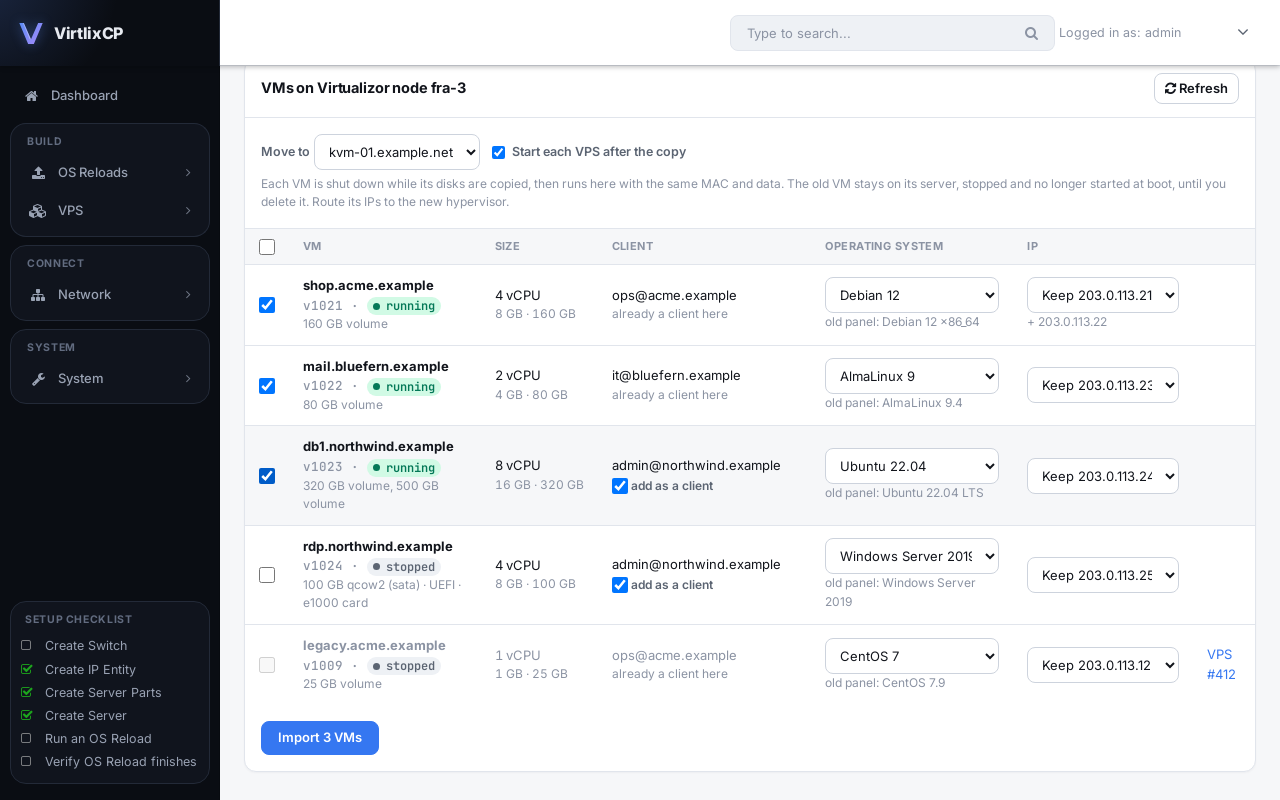
Pick the VMs
See every KVM VM with its OS, IPs and client. For each one, keep its IP or give it a new one from a pool, and add its client here.
Import
Each VM is shut down on SolusVM, its disks are copied to your hypervisor, and it starts on VirtlixCP with the same MAC, disk type and boot settings.
Check, then clean up
The old VM stays on the SolusVM node, stopped, so you can go back. Delete it once you are happy.
SolusVM to VirtlixCP: questions
Can VirtlixCP import my VPSes from SolusVM?
Yes. The built-in importer reads KVM VMs, hostnames, IPs, clients and operating systems from the SolusVM master database, then copies each VM's disks to your hypervisor.
Do my customers keep their IP addresses?
Yes, if you choose Keep for the VM. The IP must be in one of your VirtlixCP IP pools and routed to the new hypervisor. You can also give a VM a new IP instead.
Is there downtime during the move?
Each VM is stopped while its disks are copied, then started on VirtlixCP. Other VMs keep running, so you can move them one at a time or in batches.
Does VirtlixCP support OpenVZ or Xen?
No. VirtlixCP runs KVM virtual servers only, and the importer moves KVM VMs. It also runs bare metal dedicated servers in the same panel.
Can I go back if something is wrong?
Yes. The original VM stays on the SolusVM node, stopped and not started at boot, until you delete it there. If an import fails, the old VM is started again automatically.
Also moving from another panel?