
Alternatives / SynergyCP
A SynergyCP alternative for bare metal and KVM VPS
VirtlixCP automates dedicated servers with PXE OS reloads, IPMI and switch control, and runs KVM VPSes in the same panel. Its importer reads your SynergyCP inventory through the API, so nothing has to be re-entered.
Why providers move from SynergyCP to VirtlixCP
Your inventory, imported
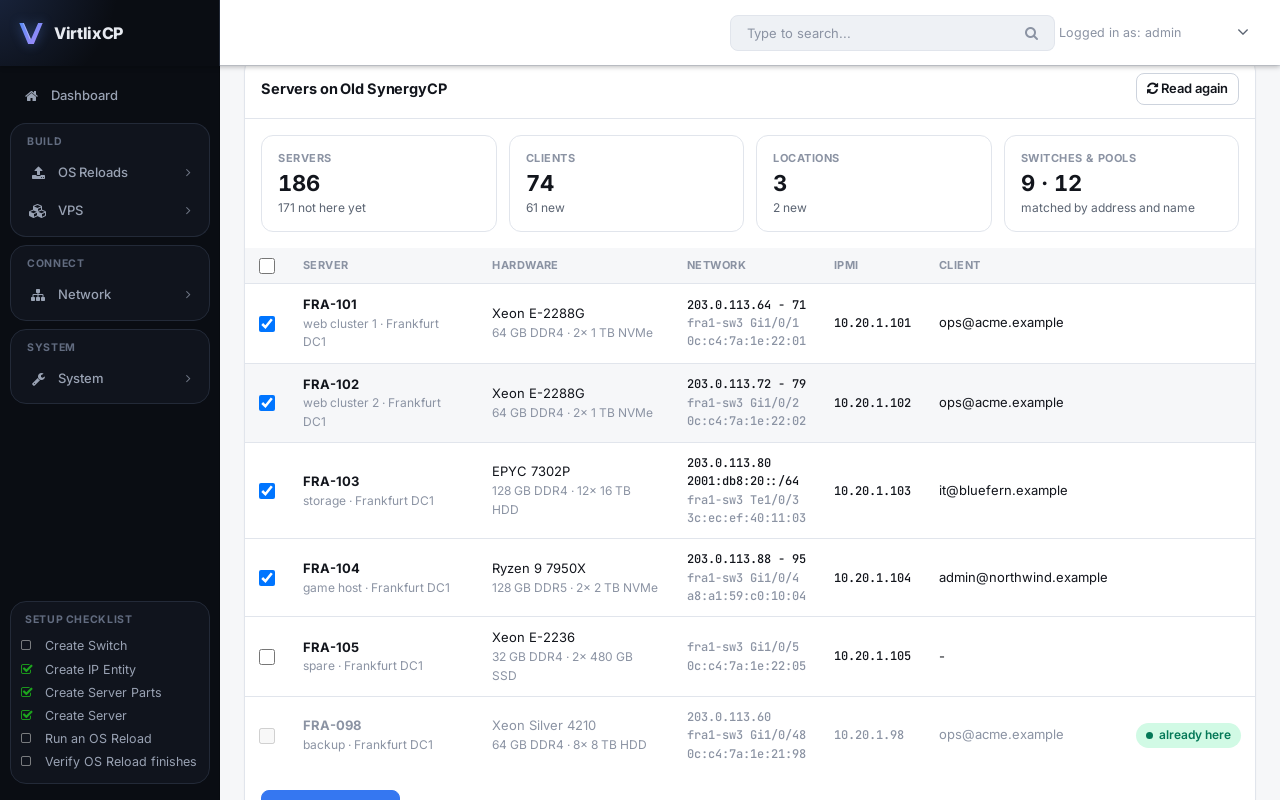
Servers with their hardware, IPs, MACs, switch ports, IPMI details and clients come over from SynergyCP, along with locations, parts, switches and IP pools.
Read-only and repeatable
The importer only reads SynergyCP through its API. Nothing is sent to your switches or IPMI, and servers already imported are skipped, so you can move in batches.
KVM VPS in the same panel
Sell KVM VPSes from the same IP space and client area as your dedicated servers, and bill both through one WHMCS module.
Self-hosted and native
VirtlixCP installs with one command and runs natively on AlmaLinux or Rocky Linux, with its own PXE, DHCP and file services.
Moving from SynergyCP
Connect with an API key
Under VPS, Import, add your SynergyCP address and an admin API key. VirtlixCP checks the key and reads your servers.
Preview
See every server with its hardware, IPs, MACs, switch port, IPMI and client before anything is imported.
Import
Import all servers or the ones you pick. Locations, parts, switches with their logins, IP pools and clients are matched to what you already have.
Switch over
Test power control and OS reloads on real servers, then point DHCP and your clients at VirtlixCP in a maintenance window you choose.
SynergyCP to VirtlixCP: questions
Can VirtlixCP import from SynergyCP?
Yes. With a SynergyCP admin API key, VirtlixCP reads your servers, hardware, IPs, MACs, switch ports, IPMI details, locations, switches, IP pools and clients.
Does the import change anything in SynergyCP?
No. It only reads through the API. Nothing is sent to your switches or IPMI controllers until you start using VirtlixCP for them.
Can I move my servers in batches?
Yes. Servers that were already imported are skipped, so you can run the import again as you move more servers.
When do my servers start using VirtlixCP?
When you point DHCP at VirtlixCP. Until then SynergyCP keeps handling OS reloads, so you can test VirtlixCP on a few servers first.
Can I also run VPSes?
Yes. KVM VPS is included with every license. Your hypervisors and VPSes share IP pools and clients with your dedicated servers.
Also moving from another panel?