
Alternatives / Virtualizor
A Virtualizor alternative for KVM VPS and bare metal
VirtlixCP manages KVM VPSes and dedicated servers from one self-hosted panel. Its built-in importer reads your Virtualizor setup and moves each VM with its disks, IPs and client account.
Why providers move from Virtualizor to VirtlixCP
VPS and dedicated servers together
Run KVM VPSes and bare metal servers from shared IP pools, with one client area for your customers and one WHMCS module for billing.
Imports from Virtualizor
VirtlixCP reads VMs, hostnames, IPs, clients, OS and bandwidth from the Virtualizor database, including setups where the master runs on another server.
Bare metal automation built in
PXE OS reloads for Linux and Windows, IPMI power and console, and switch port control, for the dedicated servers you sell alongside your VPSes.
Self-hosted, one license
One license covers your dedicated servers and VPSes together, monthly or lifetime, and the panel runs on your own hardware.
Moving from Virtualizor
Add your Virtualizor server
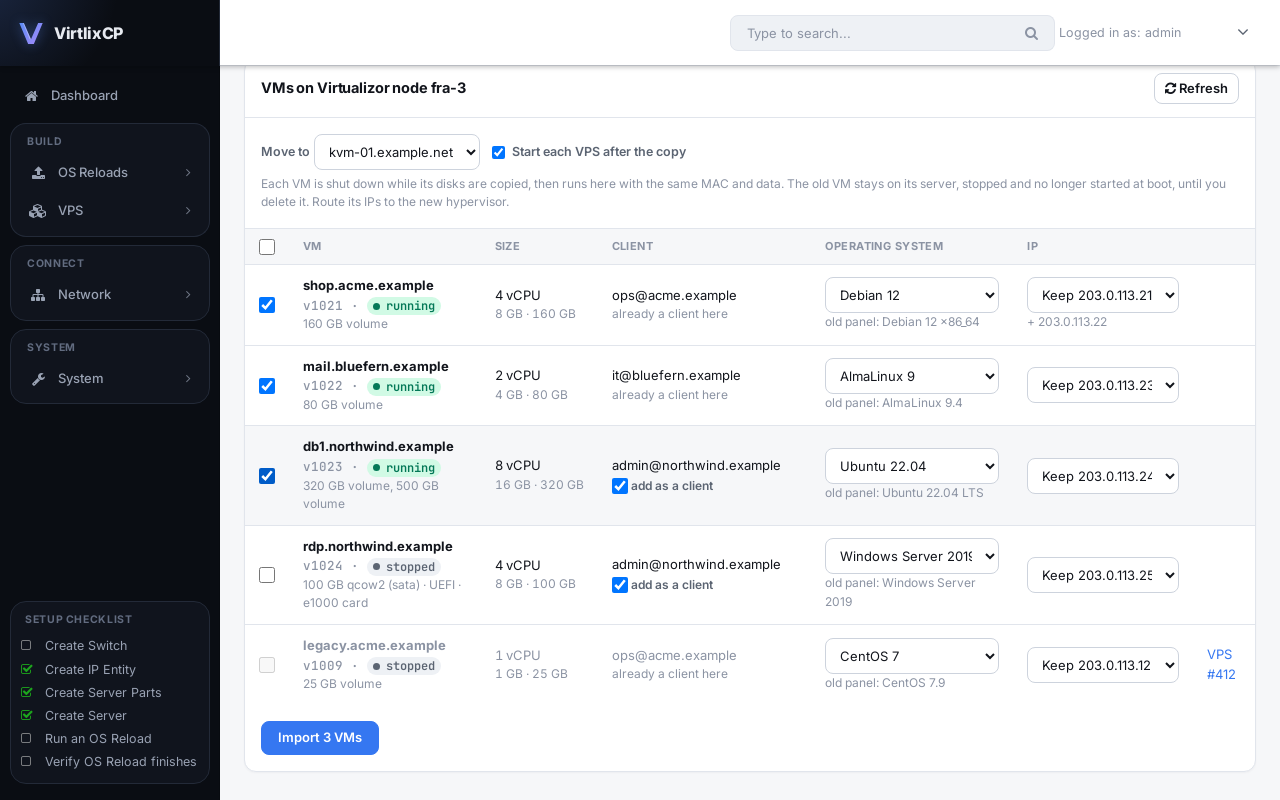
Under VPS, Import, enter the server's address and SSH login. If the Virtualizor master is on another server, add it too so the panel can read its records.
Choose what to import
Every VM is listed with its OS, IPs and client. Keep each IP or assign a new one, and link or create the client account.
Copy the VMs
Each VM is shut down on Virtualizor, its disks (LVM, qcow2 or raw) are copied to your hypervisor, and it boots on VirtlixCP as it did before.
Switch over
Check your VPSes, then delete the stopped VMs on the old server when you are ready.
Virtualizor to VirtlixCP: questions
Can VirtlixCP import VPSes from Virtualizor?
Yes. It reads VMs, hostnames, IPs, clients, OS and bandwidth from the Virtualizor database and copies each VM's disks to your hypervisor.
What if my Virtualizor master is on a different server?
Tick that the panel runs on another server and enter the master's address. VirtlixCP reads the records from the master and copies disks from the node.
Which disk types are supported?
LVM volumes, qcow2 and raw files. Layered disks are joined into one. The disk type, network card and BIOS or UEFI setting stay the same, so the system inside boots unchanged.
Does VirtlixCP support OpenVZ, Xen or LXC like Virtualizor?
No. VirtlixCP runs KVM virtual servers, plus bare metal dedicated servers. The importer moves KVM VMs.
Do my clients have to do anything?
No. Each VM keeps its data, MAC address, IPs and root password. If you add clients during the import, they get their own login to the VirtlixCP client area.
Also moving from another panel?